Formengine Drag and Drop React Form Builder Library
A powerful commercial drag-and-drop form builder for React, built on top of the free, MIT-licensed FormEngine Core. Advanced form logic, UI controls, export, and integrations.
npm i @react-form-builder/designer
 Star us on GitHub
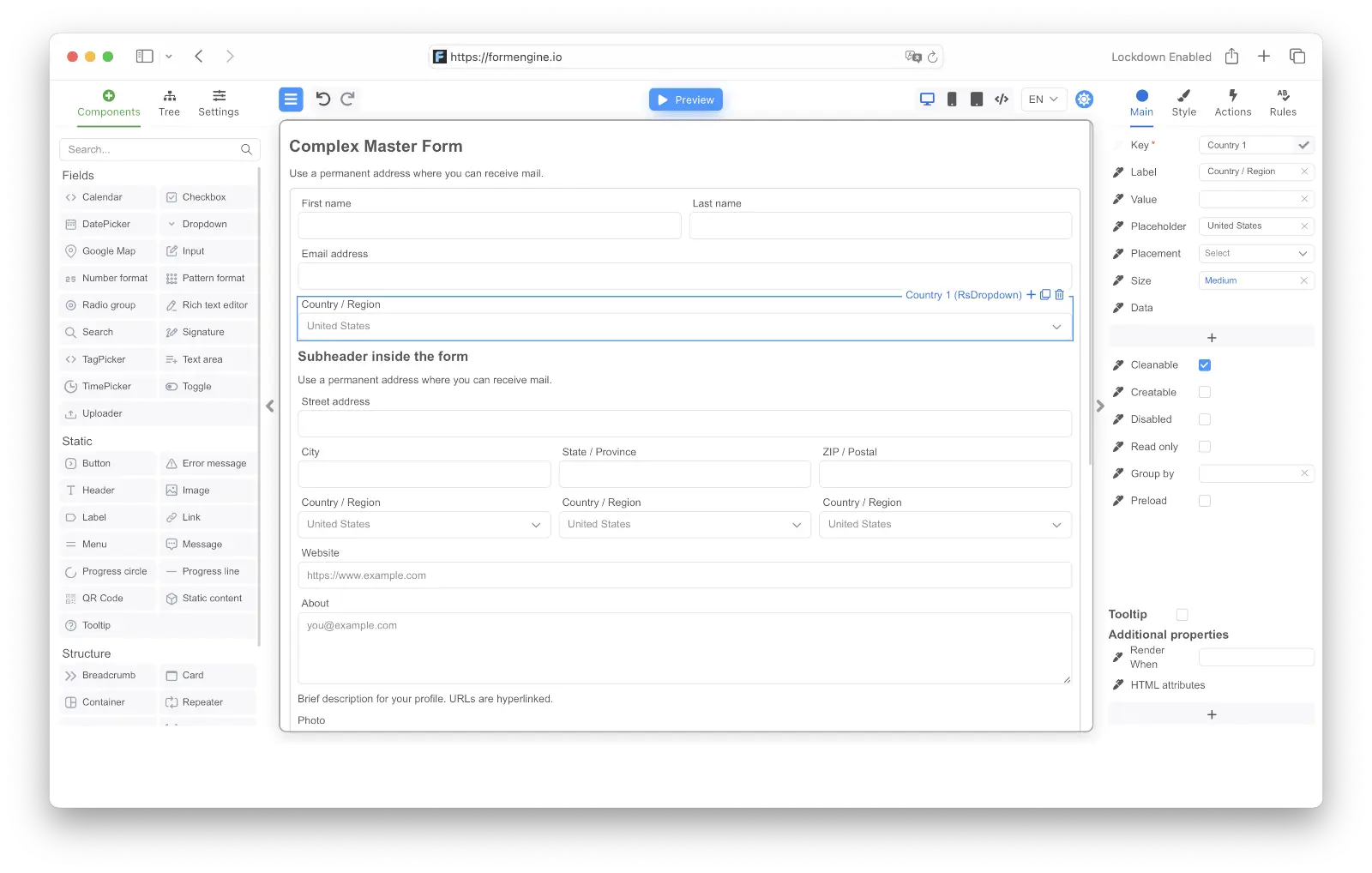
FormEngine Drag and Drop React Form Builder Library Architecture
FormEngine Designer lets you build and configure React forms with drag-and-drop simplicity. This package is only required during the form design process and is not needed for rendering forms at runtime.
-
@react-form-builder/designer
-
-
Property
-
FormEngine Form Builder That Developers Can Customize and Teams Can Use
Fast onboarding for non-developers
Developers can easily customize and embed the FormBuilder into their apps, enabling product managers, marketers, and operations teams to create and manage forms without writing code or learning React.
Visual drag-and-drop editor
Build complex forms without writing code. Just drag fields, set properties, and instantly see the result perfect for product teams, designers, and non-devs.
Custom component support
Register your own React components and use them as native building blocks inside the visual editor.
Full JSON Import export
Each form is stored as a single JSON schema portable, versionable, and ready to plug into FormEngine Core for runtime rendering in React apps.
Developer-controlled integration
The builder is framework-agnostic and embeddable. You decide where and how it runs, with full control over storage, access, and behavior.
Dynamic logic and conditional visibility
Configure show/hide logic, validations, default values, and inter-field dependencies directly in the UI no custom scripts required.
Live form preview
Instantly test how the form behaves during editing. See validation, dynamic behavior, and layouts in real time.
Multi-language support
Define labels, placeholders, tooltips, and messages in multiple languages. Integrates with common i18n tools.
Built-in layout controls
Create responsive grid-based layouts, add sections, columns, and nested groups all visually, without touching code.
Collaboration ready
Developers can implement access control and collaboration rules within the host app to support safe multi-user editing.
Designed for teams
Whether you're a solo developer or a large team, the builder streamlines form workflows between engineering, product, and business users.
White-label and embed friendly
Easily integrate into your internal tools or SaaS platform. Customize branding, behavior, and persistence logic as needed.
On premise
Self-Hosted With Full Control Over Your Data
Have FormEngine integrated into your React application as a simple component. Have full control over data and the different elements via its API.

Drag and drop form builder
Intuitive drag and drop interface
Effortlessly create custom forms with intuitive drag and drop interface.

FAQ FormEngine React Form Builder
What is the Formengine Drag and Drop Form Builder?
It's a visual editor that lets you create complex forms without writing code. Just drag components, configure properties, and export to JSON.
Is the form builder included with FormEngine Core?
No. The builder is a premium product designed to work alongside FormEngine Core, which remains open-source and free.
Can I use my own custom components in the Form builder?
Yes. You can register your custom components in the builder and use them as native blocks in your forms.
Can I embed the builder inside my own SaaS product?
Yes. The builder can be white-labeled and embedded inside internal tools or commercial platforms.
Is form builder suitable for enterprise teams?
Yes. It includes access control, audit logs, permission management, and can scale across large organizations.
Does it support drag and drop layout editing?
Yes. You can visually arrange layout containers, columns, and sections by dragging and dropping.
What kind of fields are supported in the builder?
It supports inputs, selects, checkboxes, radios, rich text, repeaters, tabs, groups, and even custom elements.
Do I need React knowledge to use the FormBuilder?
The FormBuilder empowers developers to create a no-code tool that business users, product managers, and technical teams can all use. That's its core advantage — making form creation accessible across the organization without compromising flexibility.
Can I customize the UI of the generated form?
Yes. The builder outputs only the structure and logic — you have full control over UI components via your own React implementation.
Is collaboration supported in the form builder?
Collaboration is fully supported when the builder is embedded into your application. Developers can implement user roles, permissions, and editing logic to enable safe, concurrent collaboration across teams.
Does the builder support multi-language forms?
Yes. You can define translations for field labels, placeholders, and validation messages.
Can I connect forms to APIs or workflows?
Yes. You can configure form actions to trigger external API calls, webhooks, or workflow engines.
Can I use the builder offline or self-hosted?
Yes. You can deploy the builder in your own infrastructure for full data control and privacy.
Can the builder generate mobile-friendly forms?
Yes. All generated forms are responsive by default and work well on mobile, tablet, and desktop.
Can I export forms created in the builder to use in my app?
Yes. The builder generates a full JSON schema you can plug directly into FormEngine Core for rendering in React.
Does the react form builder support advanced logic like field conditions or validations?
Yes. You can configure show/hide conditions, validations, default values, and interdependent logic visually.
Is there version control in the builder?
Yes. You can save, fork, and roll back versions of your forms at any time.
Can I preview the form before exporting it?
Yes. The builder includes a live preview mode so you can see exactly how the form will behave.
Is there a free version of the builder?
No. The FormBuilder is a commercial product with flexible licensing for individuals, teams, and OEMs.
Is it possible to restrict editing for certain users?
Yes. Role-based access is implemented by the developer when integrating the builder into an application — you can define who can view, edit, publish, or delete forms using your own permission logic.
Trusted by global organizations
Leading companies choose FormEngine for their form solutions









Testimonials
What people say
OptimaJet's FormBuilder has been a game-changer for our form creation process. Our end users are delighted with the ability to customize the form's layout and structure without any coding knowledge. It has truly streamlined our workflow and empowered our team to create visually appealing and user-friendly forms.
Samantha Lee
Staff Software Engineer, DCL Software
We've been able to produce forms two times faster than we were before FormBuilder. Adding FormBuilder to the scope was definitely the right thing for us. As a developer, I appreciate the ability to apply custom CSS styling, add external validators, and implement personalized data processing logic. The FormBuilder adapts perfectly to our project's unique requirements.
Milovan Popovic
Enterprise Applications Manager, CP AdaBytes d.o.o
FormBuilder has empowered us to create a truly tailored and seamless form-building experience. The best part? You can easily tweak and customize them to match our exact needs. The ability to monitor other fields and run validations asynchronously adds a whole new level of flexibility.
Oliver Garcia
CTO, ERP Groupe











Have a question?
Ask and we'll get back with you in 1 business day.