Open Source Lightweight React JSON Schema Form Library for React Suite
Simplify complex forms with React Suite's ready-to-use and modular components.
npm install @react-form-builder/components-rsuite
FormEngine Free React Form Components Library Architecture
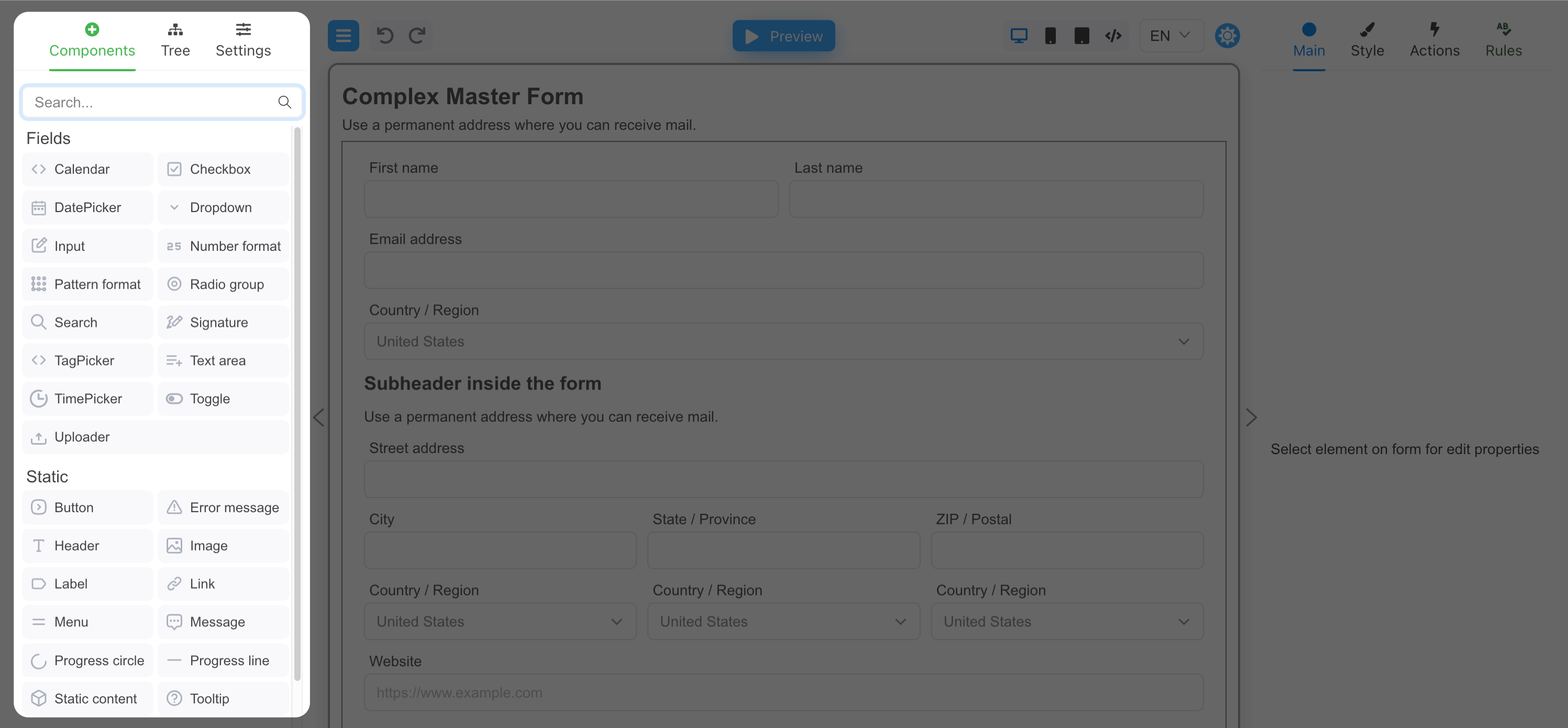
FormEngine Designer lets you build and configure React forms with drag-and-drop simplicity. This package is only required during the form design process and is not needed for rendering forms at runtime.
-
@react-form-builder/components-rsuite
Ready-to-use React Suite components
Includes built-in components and supports easy integration of custom ones. Get started fast without sacrificing flexibility.
Components that are already available within FormEngine
Container
The Container component represents a div tag that wraps other components, providing a way to group and organize content. It can be used to add padding, margins, and other styles to a group of components. It is also especially useful to define and maintain a consistent layout for components within your form.

Repeater
The Repeater component is a special component that is responsible for displaying an array of repeating components. Dynamic group of fields that can be duplicated or removed by the user.
Ready-to-use React FormEngine components library
Ready to use, MIT-licensed, and free. Includes built-in components and supports easy integration of custom ones. Get started fast without sacrificing flexibility.
Component
Description
License
Used to format phone numbers, credit card numbers, and other types of numeric data
Pattern Format
Used to format phone numbers, credit card numbers, and other types of numeric data
With FormEngine, you get a comprehensive package of ready-to-use components that can be easily customized to meet your specific needs.
Standalone Component Package Compatible with FormEngine, available under a commercial license
QR Code
Generates a QR code from dynamic or static text input
npm install @react-form-builder/components-fast-qr
Google Map
Embeds an interactive Google Map with pin and location support
npm install @react-form-builder/components-google-map
Rich Text Editor
RichTextEditor is a thin wrapper around the rich text editor Quill.
npm install @react-form-builder/components-rich-text
Signature
Provides a drawing area where users can sign documents, forms and more using a mouse, touchpad, or other input devices.
npm install @react-form-builder/components-signature
Data Grid
A versatile table component for displaying, sorting, filtering, and editing tabular data. Supports pagination, inline editing, column resizing, and customizable cell rendering for seamless data management.
FAQ FormEngine React Form Components
What is the FormEngine React Component Library?
It's a set of reusable, React form components that render UI from JSON schemas. They work seamlessly with FormEngine Core and are also directly used by the Drag & Drop Form Designer to render live previews and runtime forms.
Can I extend or replace built-in components?
Yes. The library is designed for customization. You can override default components or register new ones.
Is it possible to render a form entirely from JSON?
Yes. You can render entire forms declaratively from a JSON schema — no need to write JSX manually.
Does it work without the Drag & Drop builder?
Yes. The library only needs a JSON schema. You can generate it by hand, from code, or using any builder.
Can I add animations or transitions?
Yes. Since it's headless, you can wrap any component with animation libraries like Framer Motion.
Do I need to use a specific UI framework like MUI or Tailwind?
No. The components are unstyled by default. You can apply your own styles or connect them to any design system.
Does it support custom input types?
Yes. You can define and integrate custom React components as input types using a simple configuration API.
Is it open-source?
The component library is MIT-licensed and free to use in commercial and private projects.
Can I test components in isolation?
Yes. Each component can be used and tested independently in your app or Storybook.
Is this suitable for production-grade apps?
Absolutely. It's built for scalability, testability, and integration into real-world React applications.
Can I use just one component or do I need the whole library?
You can use components individually or as a full rendering pipeline — it's completely modular.
Is the library compatible with server-side rendering?
Yes. It works with frameworks like Next.js and Remix, supporting full SSR and hydration.
Can I integrate it with React Hook Form or Formik?
Not directly. It's built to work with FormEngine Core, which handles its own state and logic.
Does the library support repeaters and dynamic lists?
Yes. It supports repeatable groups, arrays, and nested schemas out of the box.








 Star us on GitHub
Trusted by global organizations
Leading companies choose FormEngine for their form solutions









Testimonials
What people say
OptimaJet's FormBuilder has been a game-changer for our form creation process. Our end users are delighted with the ability to customize the form's layout and structure without any coding knowledge. It has truly streamlined our workflow and empowered our team to create visually appealing and user-friendly forms.
Samantha Lee
Staff Software Engineer, DCL Software
We've been able to produce forms two times faster than we were before FormBuilder. Adding FormBuilder to the scope was definitely the right thing for us. As a developer, I appreciate the ability to apply custom CSS styling, add external validators, and implement personalized data processing logic. The FormBuilder adapts perfectly to our project's unique requirements.
Milovan Popovic
Enterprise Applications Manager, CP AdaBytes d.o.o
FormBuilder has empowered us to create a truly tailored and seamless form-building experience. The best part? You can easily tweak and customize them to match our exact needs. The ability to monitor other fields and run validations asynchronously adds a whole new level of flexibility.
Oliver Garcia
CTO, ERP Groupe
Have a question?
Ask and we'll get back with you in 1 business day.